클리앙펌] ios 4.0.2->4.0.1 다운그레이드
 http://clien.career.co.kr/cs2/bbs/link.php?bo_table=cm_iphonien&wr_id=100024&no=1http://www.coveringweb.com/2010/08/how-to-downgrade-ios-402-to-401-40. (3)
http://www.coveringweb.com/2010/08/how-to-downgrade-ios-402-to-401-40.htmlHow to: Downgrade iOS 4.0.2 to 4.0.1 / 4.0 Without SHSH Blobs [EXCLUSIVE]
Step 1: Download the iOS 4.0.1 from http://www.coveringweb.com/2010/07/download-ios-401-for-iphone-and-ipod.htmlhere, download iTunes from http://www.coveringweb.com/2010/07/download-itunes-921-for-mac-windows.htmlhere.
Step 2: Extract it with Winrar or Winzip to a folder on the
desktop. You may need to rename the firmware file from .ipsw to .zip to
be able to extract.
Step 3: Open buildmanifest.plist file from the extracted files using Notepad (for Windows) or TextEdit (for Mac OS X). Also, open restore.plist file and again replace all 8A306 with 8A400. Save this file too.
Step 4: Now download http://www.coveringweb.com/2010/08/apple-releases-ios-402-for-iphone-ios.htmliOS 4.0.2 and extract it using Winrar or Winzip.
Step 5: Drag all files extracted files from iOS 4.0.1 and replace them with all files of iOS 4.0.2.
Step 6: Delete all ".dmg" files that end with 002 leaving files
that end with 001. Then zip the new customized firmware and change it to
".ipsw" file, for example "downgrade.ipsw".
Step 7: This step is option, it helps you to ensure you get an
SHSH file request for the future, but should not be necessary to just
restore 4.0.1
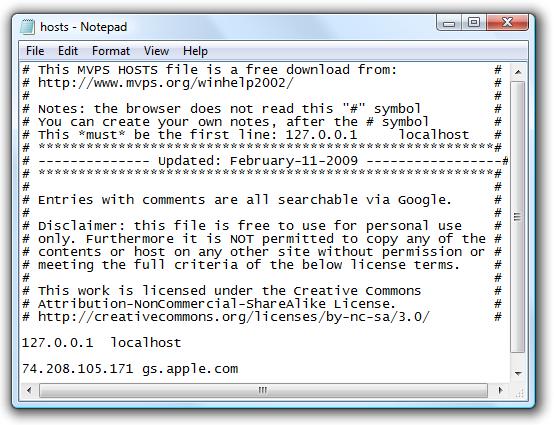
Locate "C:\Windows\System32\drivers\etc\" for Windows and "/etc/"
directory for Mac, then locate “hosts” file and Open it in Notepad (for
Windows) or TextEdit (for Mac OS X) then add this line at the bottom of
the file and save it.
74.208.105.171 gs.apple.com
http://2.bp.blogspot.com/_xODgVRIsPR8/THpyxj_ny7I/AAAAAAAABkA/xAO1rSeJkl8/s1600/HostsFile.jpg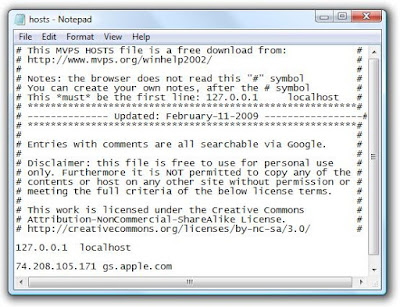
Step 8: Connect your iPhone to your PC / Mac and launch iTunes (downloaded above)
Step 9: Now, put your iPad in DFU mode by following this steps,
Connect your iPad to your computer.
Turn iPad off.
Start http://www.coveringweb.com/2010/07/download-itunes-921-for-mac-windows.htmliTunes.
Hold Power and Home buttons together for 10 seconds or so.
Release Power button but keep holding the Home button until your computer recognizes a new USB device.
iTunes will now recognize your iPad.
Step 10: Almost done, you will have to restore your iPhone to
the firmware you have customized and saved in the above steps by
Clicking on iPhone icon that appears in the left of iTunes then hold
left “alt” button or “Shift” button on Windows from the keyboard and
click on “Restore” then release the alt button. You will be promoted by a
window to select the firmware, select your firmware file
"downgrade.ipsw" you have made in the previous steps.
http://4.bp.blogspot.com/_xODgVRIsPR8/TFGWAwBpQEI/AAAAAAAABI8/tsyIJrL0uk4/s1600/20047-500.png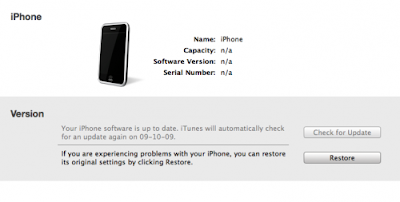

Step 11: After series of processes, iTunes will restore your device to the required firmware.
Now, You will be finally able to jailbreak and unlock your device using our guide http://www.coveringweb.com/2010/08/how-to-jailbreak-and-unlock-iphone-4-on.htmlposted here to jailbreak and unlock any iPhone.
[Thanks Anonymous for the tip]
출처: http://www.coveringweb.com/2010/08/how-to-downgrade-ios-402-to-401-40.htmlhttp://www.coveringweb.com/2010/08/how-to-downgrade-ios-402-to-401-40.html
홀홀홀
ㅇㅇ.
신고
YYesAn
내껀 어차피 안돼겠네 ㅇㅇ
내가 원하는건3.13이나 3.12니까
신고
ㅇㅇ
신고